★ Shadow Daggers | Bright Water (Minimal Wear)
Direct checkout with instant reward delivery in your CSSkill inventory.
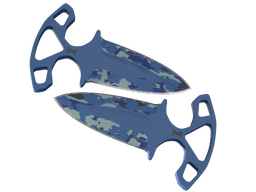
Designed for efficient brutality, using a push dagger is as simple as throwing a punch or two. It has been painted using a blue camo hydrographic.
What customers usually ask before buying
Everything you need to know before buying, receiving, and withdrawing a skin on CSSkill.
How do I receive my skin after purchase?
After successful payment, CSSkill reserves the skin to your account from our inventory.
For Steam-delivered skins, the item first appears in your CSSkill inventory and is then withdrawn to your Steam account by trade offer.
Why does the skin show in my CSSkill inventory before it reaches Steam?
This inventory-first flow lets us lock the purchased item to your account before the Steam handoff starts.
It also gives you a clear fulfillment state and a safe retry point if Steam is slow or a withdrawal needs to be re-sent.
What do I need to set up before buying a skin?
You need a valid Steam trade link in your Profile Integrations settings before a tradable skin can be withdrawn.
Your Steam account also needs to be able to receive trade offers. Missing trade access, Steam holds, or similar account restrictions can delay delivery.
Open Profile Integrations to review your Steam connection and trade link before checkout.
How fast is skin delivery on CSSkill?
Most skin orders are prepared automatically shortly after successful payment.
Final timing still depends on Steam responsiveness, the assigned bot inventory, and whether the normal automated withdrawal flow completes without interruption.
Why can fulfillment become manual in some cases?
If the automatic inventory assignment or withdrawal flow cannot complete, the order can move to manual fulfillment.
This usually happens because of Steam-side issues, trade restrictions, or inventory-matching exceptions. Your order stays tied to the skin while the handoff is completed.